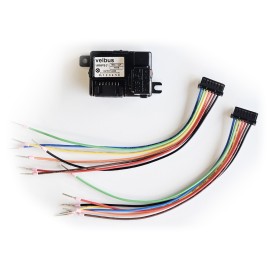
Edge lit control module with motion and twilight sensor, black glossy
search
  • Edge lit control module with motion and twilight sensor, black glossy
  • Edge lit control module with motion and twilight sensor, black glossy
  • Edge lit control module with motion and twilight sensor, black glossy
  • Edge lit control module with motion and twilight sensor, black glossy
  • Edge lit control module with motion and twilight sensor, black glossy
  • Edge lit control module with motion and twilight sensor, black glossy
  • Edge lit control module with motion and twilight sensor, black glossy

Velbus Edge lit control module with motion and twilight sensor, black glossy

Edge lit control module with motion and twilight sensor, black glossy

Quantity

Features

  • motion detector for indoor use
  • 1 channel for motion detection with adjustable timeout
  • 2 channels for light dependent motion detection with adjustable light sensitivity and timeout
  • 1 channel for absence detection with adjustable timeout
  • 2 channels for twilight detection (dark and light) with adjustable light sensitivity, reaction time and timeout
  • one pushbutton (touch technology)
  • adjustable button reaction time (0, 1, 2 or 3 seconds)
  • detection of short and long button press
  • configurable dual channel pushbutton: a different channel is selected depending on the length of the push (short or long push)
  • configurable multi-channel operation on pushbutton: the next channel is selected at each press (up to 2 channels)
  • extensive day, week and year programs plus a built-in astronomical clock (sunrise and sunset timing) are included to operate pushbuttons automatically
  • integrated temperature sensor to control the heating and air conditioning (only usable when side LEDs are turned off)
  • feedback/mood lights with RGBW side LEDs (adjustable light intensity and RGBW color)
  • the light intensity and color of the feedback and/or mood lights are independently adjustable per side
  • LED-indication for supply voltage and data (backside)
  • uses one address for the pushbutton, motion and twilight channels, and another address for the thermostat function (optional) (configurable in the VelbusLink configuration software)
  • configurable by using the Home center module (HISv2) or Velbus PC interface (VMB1USB or VMBRSUSB) and the free VelbusLink configuration program
  • available in black and pure white, in both glossy and frosted finish

Specifications

  • detection range: 94° horizontal x 82° vertical
  • detection distance (motion): max. 5 m
  • light sensitivity: 10...300 lux
  • touch-technology: SMSC RightTouch®
  • front material: safety glass
  • supply voltage: 15±3 VDC
  • possible addresses: 250
  • program steps: max. 66
  • dimensions:
    • LxWxD: 86 x 86 x 11 mm (4 mm glass + 7 mm to wall)
    • installation depth: 28 mm including the connector
  • temperature range: -10°C to +40°C
  • not suitable for installation on electrically conductive surfaces (eg. metal), or nearby sources of electromagnetic disturbances
  • power consumption:
    • when side LEDs are off: 25 mA
    • when side LEDs are full brightness: 110 mA
  • mounting frame included (screw / clamp)

FAQ

Q. How to make a Velbus motion sensor switch the light?

A. A Velbus motion sensor (VMBPIRO, VMBPIRC, VMBPIRM, VMBGP4PIR) has to switch the light on during 3 minutes when motion is detected. How do I program this in Velbuslink? Read more ... (PDF)Q. How can I make a Velbus motion sensor switch a relay at the second movement within 1 minute (to avoid false alarms)?A. Read more... (PDF)

Q. How can I disable and enable push buttons and sensor channels at certain times?

A. A light needs to be switched by a PIR sensor from 8:00 until 22:00, and by a push button from 22:00 until 8:00. How do I program this in Velbuslink? Read more... (PDF)

Q. How can I make a motion detector set a light to a certain dim value during a certain time?

A. A Velbus motion sensor needs to turn a light on at a certain dim value (eg. 50%) during a certain time (eg. 1 minute).
This can be done as follows:
- in the configuration of the Velbus motion sensor module, set the timeout of the motion output to 1s
- create an action "Set to percentage" with the motion output channel as initiator and the dimmer channel as subject. Set the dim percentage parameter (in our example 50%). This action has also a "duration" parameter. Set this to the desired on time (in our example 1 minute)Q. Advanced configuration of a PIR motion sensor, light and ventilation in the toiletA. The following functionality needs to be programmed:
- a Velbus PIR motion detector switches the light on in the toilet
- 2 minutes after the light goes on, the ventilation has to start
- 3 minutes after the light goes out, the ventilation has to stop
- if the light is off before the 2 minutes have passed, the ventilation has to stay off 
Read more... (PDF)

Q. PIR sensor different dimming values before and after sunset

A. My PIR sensor switches a dimmed light circuit. When movement is detected, the light should be switched on at 70% during the day, and at 30% during the night. Read more ... (PDF)

VMBELPIR-BG
New

You might also like